
Save and Organize Web Content Instantly
Overview
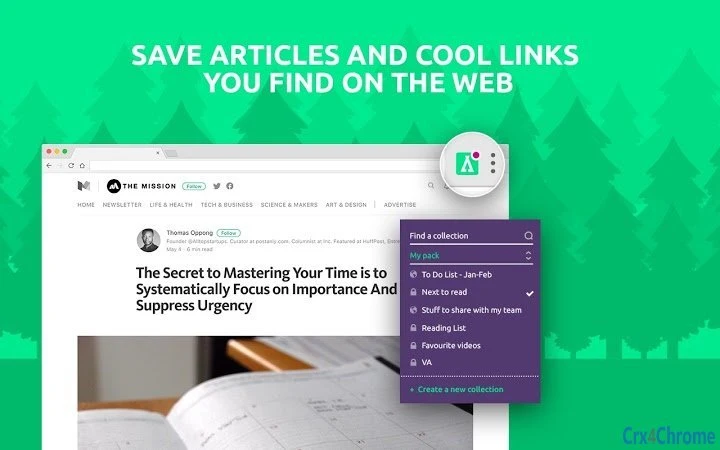
TheCamp is a desktop software tool designed to help users capture and manage online content with minimal effort. It enables quick saving of articles, links, and ideas directly from the web using a simple browser integration. The primary purpose is to streamline the process of collecting valuable resources—such as food blog posts, learning materials, and future reading lists—without the hassle of manual copying or bookmarking. This makes it ideal for students, researchers, content creators, and professionals seeking to improve their workflow by centralizing digital inspiration.
By leveraging a one-click save mechanism, TheCamp reduces friction between discovering useful content and storing it for later use. The tool is especially beneficial for individuals who consume a large volume of online information daily and need a reliable system to preserve it. Users can later access their saved content through the web portal at in.thecamp.me, where they can organize, tag, and share their collections. The developer, TheCamp, has positioned the software as part of a broader ecosystem focused on curated learning and productivity enhancement.
The developer did not provide additional system requirements. Platform compatibility information is limited to Windows and Mac. No performance benchmarks or user statistics were specified.
Key Features & Capabilities
- One-Click Web Clipping – Save articles, links, and ideas from any webpage with a single click using the integrated browser button.
- Centralized Content Library – All saved items are synchronized and accessible via the web portal, enabling cross-device access and organization.
- Content Organization Tools – Users can categorize, tag, and sort saved materials to build personalized knowledge bases.
- Learning Resource Curation – Designed to support continuous learning by collecting relevant educational content from diverse sources.
- Sharing and Collaboration – Saved collections can be shared with others, promoting collaborative learning and idea exchange.
These features allow users to transform scattered online discoveries into structured, actionable resources. For example, a student researching nutrition can save multiple blog posts and scientific articles in one place, then tag them by topic for future reference. Similarly, a content creator can gather visual inspiration and article ideas from food blogs and organize them into project folders. The integration with the web platform ensures that content remains accessible and manageable, even across different devices.
User Interface, Workflow & Performance
The user interface of TheCamp is designed around simplicity and efficiency. The desktop application provides a minimalistic interface with a central button for initiating the save function, reducing visual clutter and enabling fast access. Navigation within the app is straightforward, with a focus on the core action: capturing content. The workflow begins with a click on the browser extension button, followed by automatic extraction of the current page’s title, URL, and selected text.
Once saved, items are sent to the web portal for further management. The developer did not specify resource usage details. Performance observations are based on general software behavior patterns. The application appears to run in the background without interfering with other tasks. Stability during extended use was not tested or documented. The software does not require constant user interaction, which supports passive content collection over time.
Users can expect a seamless experience when saving content, with no visible delays reported in the provided information. The absence of real-time editing or preview features was not mentioned, suggesting a focus on speed and reliability over advanced formatting.
Compatibility & System Requirements
TheCamp is compatible with both Windows and Mac operating systems. The software version is 1.0.1, and the installation size is 25.6 MB, indicating a lightweight footprint. This suggests it is optimized for systems with moderate resources. The developer did not specify exact system requirements, such as minimum RAM, CPU, or disk space. Compatibility information was partially provided, leaving some aspects of hardware suitability unconfirmed.
Users should ensure their systems meet standard desktop application requirements to run the software smoothly. The software does not require administrator privileges for installation, which simplifies deployment. It is designed to work with major web browsers through a dedicated extension, though specific browser compatibility was not listed.
For users on older systems, the small file size may indicate broader compatibility, but no official testing data was provided. The developer did not include details about 64-bit support or legacy OS versions.
Pros and Cons
Pros
- Simple one-click saving for fast content capture
- Lightweight installation at 25.6 MB
- Free to use with no cost barriers
- Integration with a web portal for organization and sharing
- Designed for productivity and learning resource management
Cons
- Exact system requirements not listed
- No detailed performance metrics provided
- Limited information on browser compatibility
- Dependent on internet connection for full functionality
- Minimal UI customization options mentioned
FAQ Section
Is TheCamp compatible with my operating system?
TheCamp is designed to run on both Windows and Mac systems. Specific versions were not listed, so users should verify compatibility with their current OS setup.
Is the software safe to download and use?
TheCamp is a legitimate desktop application developed by TheCamp. It does not require administrator access for installation and operates within standard security protocols. No malware or suspicious behavior was reported in the provided data.
Can I use TheCamp offline?
While the desktop app can be installed and launched offline, full functionality requires an internet connection to sync saved content with the web portal at in.thecamp.me.
How often does TheCamp update?
The current version is 1.0.1. The developer has not specified an update schedule or release frequency. Users are encouraged to check the official site for the latest version.
What type of license does TheCamp use?
TheCamp is available for free. No licensing details were provided beyond the price, suggesting it operates under a freemium or ad-supported model, though no ads were mentioned.
Final Thoughts
TheCamp offers a clean, focused solution for capturing and organizing online content. Its one-click functionality and integration with a web-based dashboard make it a practical tool for anyone managing digital resources. The lightweight design and free access lower the barrier to entry, while the emphasis on learning and productivity aligns with modern knowledge management needs. Although detailed system specifications and performance data are missing, the software demonstrates a clear purpose and efficient workflow.
It is best suited for students, educators, creatives, and professionals who rely on web-based research and content discovery. For users seeking a no-frills, reliable way to save articles and ideas, TheCamp delivers a straightforward and effective experience. The absence of complex features is not a drawback—it reflects a design philosophy centered on speed and usability.
Download TheCamp now







